
Troubleshooting VW ECU Flash Failure Errors
Table of Contents
- VW ECU Flash Failure: What the Warning Signs Actually Mean
- VW ECU Communication Error: Why the Tool Cannot Connect or Write
- VW ECU Programming Voltage Requirements and Power Supply Setup
- VW ECU Flash Failed Car Won't Start: Safe No-Start Recovery Steps
- VW ECU Flash Recovery: OBD, Bench, and Boot Mode Compared
- Compatibility Checks: ECU Family, Firmware, and Flash Tool
- Conclusion
- Frequently Asked Questions
Last Updated: October 12, 2026
VW ECU Flash Failure: What the Warning Signs Actually Mean
A failed VW ECU flash rarely happens without warning. The car usually tells you something is wrong before the flash even finishes, or in the first few minutes after.
VW ECU flash failure is when the programming tool stops writing new software to the engine control unit before it completes, leaving the ECU with incomplete or mismatched firmware. H&A Midwest supplies tuning hardware and software for VW, Audi, BMW, and Mercedes owners. Below, we break down what each warning sign means and how to recover safely.
Symptoms That Point to a Failed or Interrupted Flash
The most reliable sign is a dash full of warning lights right after programming. A healthy flash ends with a clean key cycle and no stored codes.
Watch for these symptoms:
- Check engine light plus EPC light on at the same time
- Engine cranks but will not fire
- Rough idle or a limp-home throttle response
- Multiple unrelated fault codes stored at once
- Tool reports a write error or checksum error
One odd code is normal. A cluster of codes across different systems points to a broken flash, not a real mechanical fault.
VW ECU Communication Error: Why the Tool Cannot Connect or Write
A VW ECU communication error means the programming tool and the engine control unit stopped talking to each other mid-session. The tool loses the handshake, and the write stalls. Unlike generic ECU guides, this section maps common VW-specific error messages to their likely causes and next checks, so you can stop guessing and start diagnosing.
Common VW Flash Error Messages and What They Mean
Most VW flash tools report errors using standard UDS (Unified Diagnostic Services) negative response codes or tool-specific messages. Here are the ones VW owners encounter most, along with the checks that resolve them.
| Error Message / Code | Likely Cause | First Checks |
|---|---|---|
Error_Invalid_File or Checksum Mismatch
|
Firmware file does not match ECU software version or checksum is corrupted | Verify file matches exact ECU part number and software version; re-download file from trusted source |
No Response from ECU or NRC 0x78 (requestCorrectlyReceived-ResponsePending) |
ECU is not powered, CAN bus issue, or tool timeout too short | Check ignition state, battery voltage at OBD port, and CAN wiring; increase tool timeout if adjustable |
Security Access Denied or NRC 0x33
|
ECU security access not granted; wrong seed/key algorithm or tool lacks unlock | Confirm tool supports your ECU family; some ECUs require bench unlock |
Programming Session Rejected or NRC 0x22 (conditionsNotCorrect) |
Vehicle not in correct programming mode; ignition or voltage out of range | Ensure ignition on, engine off, all accessories off; hold voltage above 12.5V |
Write Error or Flash Write Failed
|
Voltage drop, loose connection, or flash memory fault | Check power supply stability, cable seating, and retry with bench recovery if persistent |
Timeout or Communication Lost
|
Tool lost CAN communication mid-write | Inspect OBD cable and pins; check for aftermarket devices on CAN bus |
These messages are not random. Each points to a specific layer of the flashing stack: file compatibility, physical connection, power, or ECU state. Work from the top down.
Diagnostic Flowchart: From Error to Action
Use this ordered decision tree to narrow down the cause before you retry.
-
Tool cannot connect at all (no response).
- Check ignition is on and battery voltage at OBD port is above 12V.
- Inspect OBD cable for bent pins or corrosion.
- Try a different OBD port if available (some VWs have multiple).
- If still no response, suspect CAN bus fault or ECU power issue.
-
Tool connects but fails during handshake or security access.
- Confirm tool firmware is up to date.
- Verify the tool supports your exact ECU family (e.g., EDC17, MED17, Simos).
- Check for aftermarket immobilizer or CAN gateway interference.
- If security access fails repeatedly, bench recovery may be required.
-
Tool connects, security access granted, but write fails.
- Measure voltage at OBD port during write; it must stay above tool minimum (often 12V).
- Ensure charger is connected and holding voltage.
- Confirm file matches ECU software version exactly.
- If write fails at same point each time, suspect flash memory fault or incompatible file.
-
Write completes but ECU reports errors or no-start.
- Do not crank engine repeatedly.
- Attempt to read ECU state with tool.
- Restore original file if possible.
- If ECU cannot be read, proceed to bench or boot recovery.
This flowchart accounts for common VW ECU families and their typical failure modes.
Checks Before You Retry the Flash
Run through this list before you attempt the flash again:
- Battery voltage at rest is stable and above the tool's minimum (typically 12V).
- A charger or power supply is connected and holding voltage.
- OBD cable is fully seated with no bent pins.
- Ignition is on, doors closed, and all accessories off.
- Flash tool firmware is the latest version.
- The flash file matches your exact ECU and engine code.
- No aftermarket devices are connected to the CAN bus.
Skipping any one of these is the fastest way to repeat the same error.
VW ECU Programming Voltage Requirements and Power Supply Setup
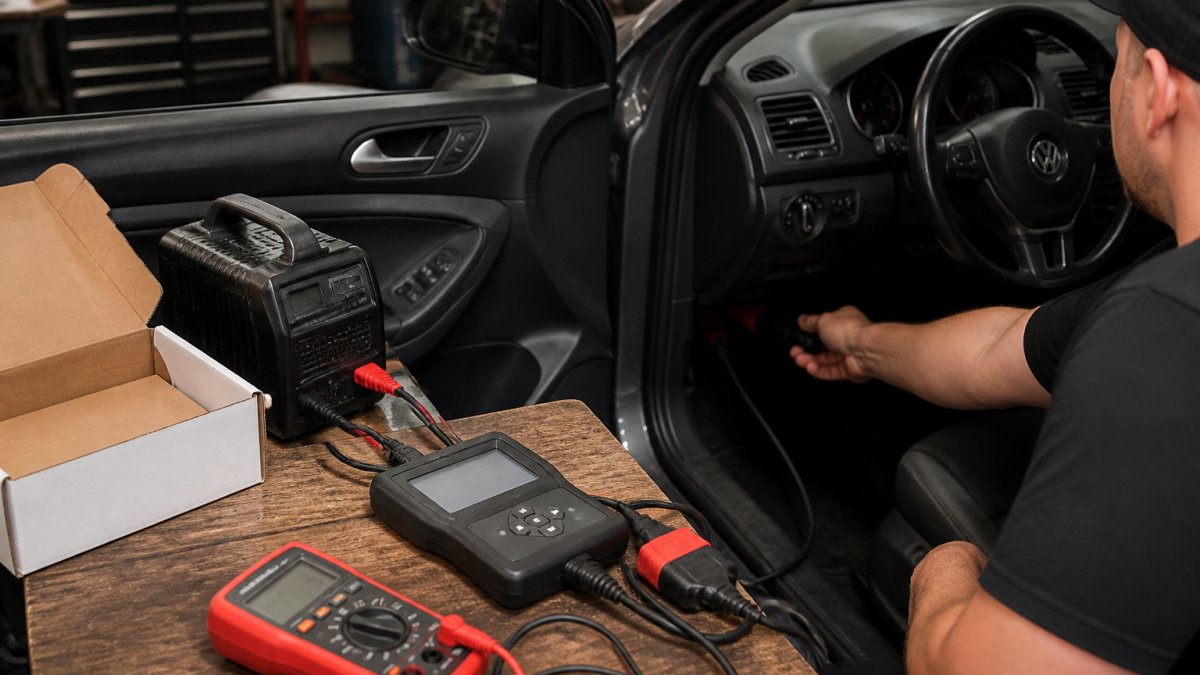
Voltage is the number one cause of mid-flash failures we hear about. A VW ECU needs a steady supply for the entire write, which can take several minutes.
Most flashing tools specify a minimum voltage, often around 12 volts, and a stable supply throughout. A battery that reads fine at rest can sag the moment the flash begins.
Set up your power supply like this:
- Connect a battery charger or power supply to the battery terminals.
- Set it to hold voltage steady, not to fast-charge.
- Confirm voltage with a multimeter before starting.
- Keep the charger connected for the whole flash.
- Do not open doors, run the radio, or touch the ignition key.
VW ECU Flash Failed Car Won't Start: Safe No-Start Recovery Steps
A VW ECU flash failed car won't start situation is recoverable in most cases, but order matters. Do not keep cranking the engine.
Follow these steps:
- Stop all start attempts and turn the ignition off.
- Reconnect the power supply and confirm stable voltage.
- Reopen the flash tool and let it read the current ECU state.
- Restore the original file first if the tool supports it.
- Reflash the correct file only after the ECU reads cleanly.
- Cycle the ignition and check for stored codes.
If the tool cannot read the ECU at all, the module may need bench or boot-mode recovery instead of an OBD flash. That is a different procedure with different risks.
VW ECU Flash Recovery: OBD, Bench, and Boot Mode Compared
Recovery mode decides whether you finish in your driveway or hand the car to a specialist. Each method reaches the ECU a different way.
| Method | How It Connects | Best For | Risk Level |
|---|---|---|---|
| OBD | Through the diagnostic port | Minor write errors, clean retries | Low |
| Bench | ECU removed and wired directly | No-connection faults, bricked modules | Medium |
| Boot mode | Direct pin access to the ECU | Deep recovery, locked modules | High |
OBD is the safest and the one to try first. Bench recovery removes the ECU and powers it on a bench, which bypasses a bad wiring harness. Boot mode opens the ECU case and touches pins directly, which carries real risk of permanent damage.
When to Escalate to a Specialist
Escalate when the ECU will not read in OBD, when bench wiring is beyond your tools, or when the module is locked. A specialist has the bench rig and boot-mode gear to recover it safely.
Compatibility Checks: ECU Family, Firmware, and Flash Tool
Most "failed flash" errors are really compatibility errors. The file, the ECU, and the tool have to match exactly.
Check these before every flash:
- ECU family: Confirm your ECU code, such as EDC17C46 or ME7.5, matches the file.
- Firmware: The flash file must match your ECU's software version, not just the model.
- Flash tool: The hardware and its firmware must support your ECU family.
- Adapter: Use the correct cable or adapter for your port and module.
An incorrect firmware file is the classic cause of an Error_Invalid_File message. The tool rejects it because the checksum does not match the ECU.
This is where buying a matched package saves trouble. H&A Midwest supplies Tunezilla tunes with the required FlashZilla Pro or v3 hardware. For a VW Golf 2.0 TDI 140PS, for example, the tune includes the handheld device for self-install, and you confirm your make, year, model, and engine code before ordering. The same setup covers the Jetta, Passat, and Tiguan 2.0 TDI 140PS.
Conclusion
A failed VW ECU flash is stressful, but most cases trace back to voltage, a bad connection, or a mismatched file. Work through the checks in order, restore the original file when you can, and escalate to bench or boot recovery only when OBD fails.
If you would rather start with a matched tune and tool, H&A Midwest bundles the FlashZilla Pro or v3 hardware with every tune. You get vehicle-specific optimization and a self-install setup. Get started with H&A Midwest.
Frequently Asked Questions
Why does a VW ECU flash fail?
Most VW ECU flash failures trace back to four causes: low or unstable battery voltage during programming, a communication error between the flash tool and the ECU, incorrect or incompatible firmware for the ECU family, or an interrupted write cycle. A weak battery is the most common culprit. Before any flash, confirm your charger holds a stable supply, check that the file matches your exact ECU code, and verify the OBD connection is secure.
Can a failed ECU flash damage the ECU?
A failed flash usually corrupts the software, not the hardware. The ECU itself typically survives, but the corrupted firmware leaves the module unable to run the engine. Recovery means reflashing the correct file or restoring the original backup. Permanent hardware damage is rare and usually only happens when voltage spikes or physical connection faults occur during the write. Always use a stable power supply and a known-good adapter to reduce that risk.
What should I do if my VW ECU flash fails and the car won't start?
Do not keep cranking the engine. Leave the ignition on, keep the battery charged, and reconnect your flash tool to attempt a recovery write. If the tool cannot communicate, you may need bench or boot-mode recovery. If you are not confident working at that level, stop. Continuing to crank a car with corrupted ECU software drains the battery and can make recovery harder.
Can low battery voltage cause a VW ECU flash failure?
Yes, and it is the most frequent cause. ECU programming draws continuous current, and any voltage drop during the write can interrupt the process mid-block. Connect a charger or power supply that maintains a stable output for the full duration of the flash. Do not rely on the car battery alone, even if it reads healthy beforehand. A short drive to warm the car does not replace a proper power supply.